






This guide is part of the Steam series
1.
How to add a collection in Steam
2. How to disable notifications in Steam
3. How to enable downloads during gameplay on Steam
4. How to enable high contrast mode in Steam
5. How to set auto updates in Steam
6. How to switch to Offline Mode in Steam
7. How to view hidden games in Steam
2. How to disable notifications in Steam
3. How to enable downloads during gameplay on Steam
4. How to enable high contrast mode in Steam
5. How to set auto updates in Steam
6. How to switch to Offline Mode in Steam
7. How to view hidden games in Steam
Make: Valve
Model / Product: Steam
Version: 1785799196
Objective / Info: Learn how to go offline in Steam.
Model / Product: Steam
Version: 1785799196
Objective / Info: Learn how to go offline in Steam.
1
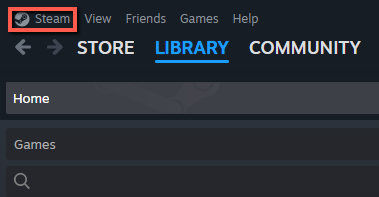
Click on "Steam" in the top-left.
2
In the dropdown, click on "Go Offline..."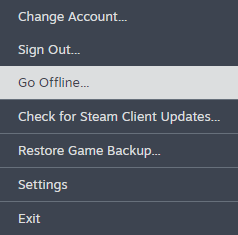
3
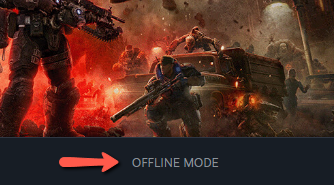
You should now be offline with "Manage Downloads" at the bottom changed to "Offline Mode".
4
This task should be complete. Review the steps if you had any issues and try again. Submit questions or request for more guides in the questions section below.
comments powered by Disqus
 Ask a question or provide an answer