





This guide is part of the Other series
Make: WMATA
Model / Product: Smartrip
Version: N/A
Objective / Info: Add funds to Smartrip card while on Metro bus. This card is used for payment within the Washington Metropolitan Area Transit Authority). See en.wikipedia.org for more information.
Model / Product: Smartrip
Version: N/A
Objective / Info: Add funds to Smartrip card while on Metro bus. This card is used for payment within the Washington Metropolitan Area Transit Authority). See en.wikipedia.org for more information.
1
Purchase Smartrip card Note :Card can be purchased at any local metro station in the DC, MD and VA region.
2
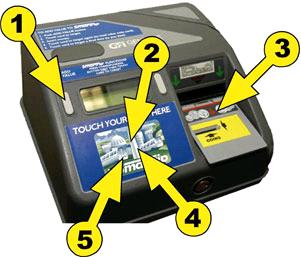
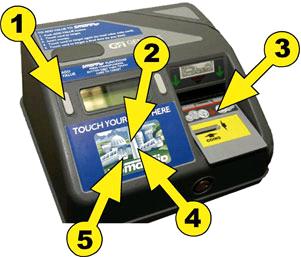
Press the gray add value button on the left hand side of the farecard machine.
Note :
Item 1 in the image.
3
Gently touch or tap your card on the smartrip image.
Note :
Item 2 in the image.
4
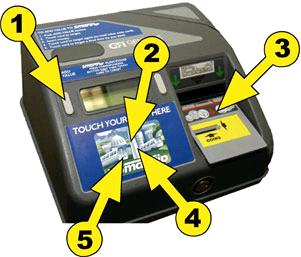
Add bills or/and coins ($1,$5,$10 or $20)
Note :
Does not except pennies. Item 3 in this image.
5
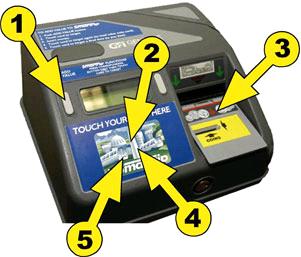
Touch your card again. The value is now added to your card.
Note :
Items 4 in this image.
6
Touch your card a final time. The fare for your ride is deducted. Item 5 in the image in step 5. Note :
In addition to Metro Smartrip card can also be used on Metrorail, and other local buses such as Ride-On (in Montgomery County) and The Bus (in Prince Georges County)

comments powered by Disqus
 Ask a question or provide an answer