






This guide is part of the Evernote series
1. How to add a new note in Evernote
2. How to delete a note in Evernote
3. How to edit an existing note in evernote
4. How to save webpages to Evernote with webclipper
5. How to set your notes location in evernote
6. How to tag a note in Evernote
7. How to use Evernote
8. Install the evernote web clipper chrome extension
9. Take photos on your mobile device with Evernote
2. How to delete a note in Evernote
3. How to edit an existing note in evernote
4. How to save webpages to Evernote with webclipper
5. How to set your notes location in evernote
6. How to tag a note in Evernote
7. How to use Evernote
8. Install the evernote web clipper chrome extension
9. Take photos on your mobile device with Evernote
Make: Evernote Corp
Model / Product: Evernote
Version: Web Interface
Objective / Info: Learn how to add a new note in Evernote using the web interface.
Model / Product: Evernote
Version: Web Interface
Objective / Info: Learn how to add a new note in Evernote using the web interface.
1
Visit www.evernote.com and sign in.

2
Click the "New Note" button.

3
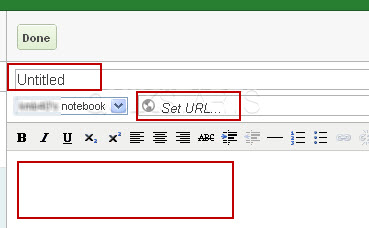
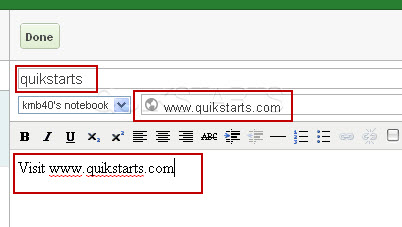
Complete the title, url (if applicable) and body text fields.
4
Make sure the information is correct.
5
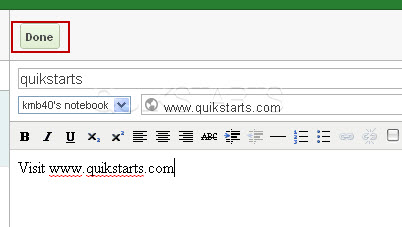
Click the "Done" button.
6
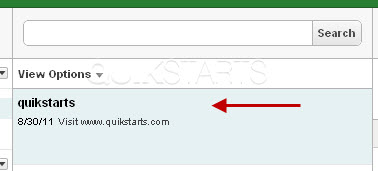
The new note should post in the middle column.
7
This task should now be complete. If not, review and repeat the steps as needed. Submit any questions using the section at the bottom of this page.
comments powered by Disqus
 Ask a question or provide an answer