






This guide is part of the Evernote series
1.
How to add a new note in Evernote
2. How to delete a note in Evernote
3. How to edit an existing note in evernote
4. How to save webpages to Evernote with webclipper
5. How to set your notes location in evernote
6. How to tag a note in Evernote
7. How to use Evernote
8. Install the evernote web clipper chrome extension
9. Take photos on your mobile device with Evernote
2. How to delete a note in Evernote
3. How to edit an existing note in evernote
4. How to save webpages to Evernote with webclipper
5. How to set your notes location in evernote
6. How to tag a note in Evernote
7. How to use Evernote
8. Install the evernote web clipper chrome extension
9. Take photos on your mobile device with Evernote
Make: Evernote Corp
Model / Product: Evernote
Version: Chrome ver 15.0.874.12 extension
Objective / Info: Learn how to install the Evernote web clipper Chrome browser extension. This extension adds a button to the toolbar which allows you to add content to Evernote. goo.gl
Model / Product: Evernote
Version: Chrome ver 15.0.874.12 extension
Objective / Info: Learn how to install the Evernote web clipper Chrome browser extension. This extension adds a button to the toolbar which allows you to add content to Evernote. goo.gl
1
Visit the Chrome app store at http://goo.gl/fufRo and click the "Add to Chrome" button.
Note :
Click this url in the "Objective / Info" box above. If you do not have a Google account, you can create one for free but one is required.

2
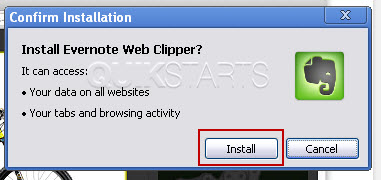
A pop up window should open, click the "Install" button.
3
A new tab should open showing the Evernote web clipper page.

4
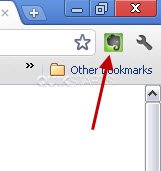
The browser should show an Evernote icon. Note :
You will need to sign in to Evernote to use the extension.
5
This task should now be complete. If not, review and repeat the steps as needed. Submit any questions using the section at the bottom of this page.
comments powered by Disqus
 Ask a question or provide an answer