






This guide is part of the Facebook series
1.
How to close the facebook chat sidebar
2. How to login to Facebook
3. How to upload videos on facebook
4. How to use Facebook
5. Remove friends cell contact numbers from facebook
6. Stop exporting your mobile contacts to facebook
2. How to login to Facebook
3. How to upload videos on facebook
4. How to use Facebook
5. Remove friends cell contact numbers from facebook
6. Stop exporting your mobile contacts to facebook
Make: Facebook Inc
Model / Product: Facebook
Version: Facebook
Objective / Info: Learn how to login to Facebook from your desktop, laptop, netbook, or tablet computer or mobile web browser.
Model / Product: Facebook
Version: Facebook
Objective / Info: Learn how to login to Facebook from your desktop, laptop, netbook, or tablet computer or mobile web browser.
1
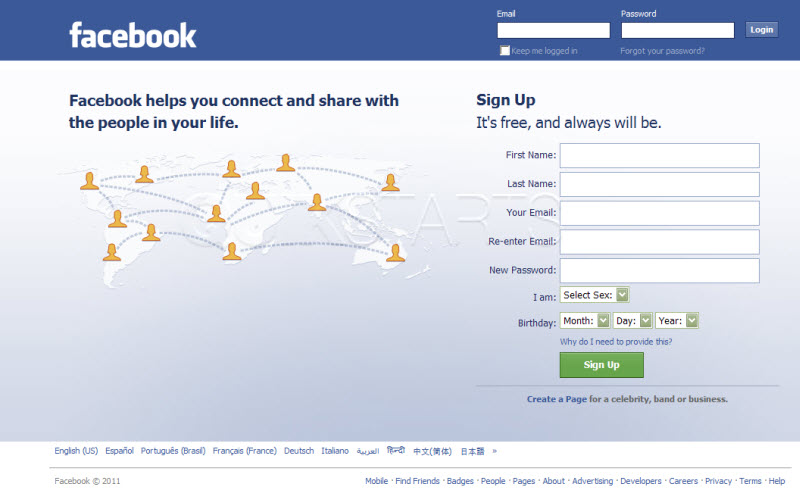
Open your web browser and visit www.facebook.com
2
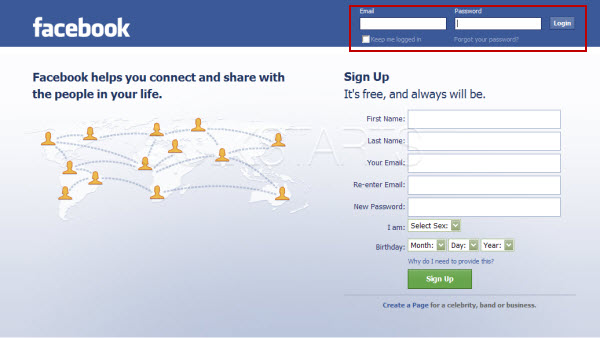
Locate the login fields in the upper right hand corner of the page.
3
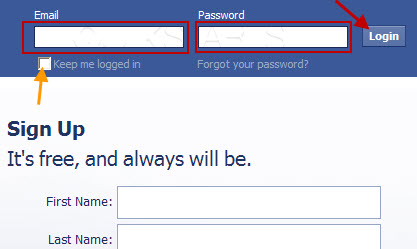
Enter the correct email address for the username and the password, then click the "Login" button.
Note :
Place a check mark in the "Keep Me logged in" box if you want to stay logged into facebook at all times. This means you wont have to enter the username and password when you return to the site.
4
You should see your facebook page.5
This task should now be complete. If not, review and repeat the steps as needed. Submit any questions using the section at the bottom of this page.
comments powered by Disqus
 Ask a question or provide an answer