





This guide is part of the Wordpress series
1.
How to add links to the sidebar in wordpress
2. How to change the subtitle in wordpress
3. How to create a child theme in Wordpress 3.2
4. How to use Wordpress
5. Summarize post in wordpress with the more tag
2. How to change the subtitle in wordpress
3. How to create a child theme in Wordpress 3.2
4. How to use Wordpress
5. Summarize post in wordpress with the more tag
Make: Wordpress
Model / Product: Wordpress
Version: 3.2
Objective / Info: Learn how to create a child theme in Wordpress 3.2. This method makes it easy to have a theme that you can edit that wont require core them changes following updates.
Model / Product: Wordpress
Version: 3.2
Objective / Info: Learn how to create a child theme in Wordpress 3.2. This method makes it easy to have a theme that you can edit that wont require core them changes following updates.
1
Access the site via FTP or other means that allows you to see the files structure where the site running wordpress is hosted. Note :In this example we are using FTP.
2
Browse to the template files for your wordpress installation. Note :In this example we are using the standard path at root/wp-content/themes/
3
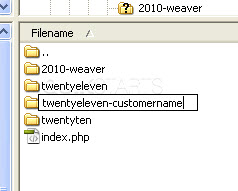
Create a directory named "twentyeleven-customname" Note :
customname can be whatever you like. Except for blank.
4
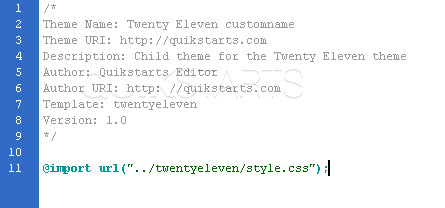
Create a style sheet and drop it into the new directory. All of the elements with the exception of the import syntax can be edited as you please.
5
Return to the themes section of wordpress and the new theme should appear on the list of themes as twentyeleven-customname. This basically gives you a new child theme.6
You may be asking is that really it. Well, it depends on what your reason for creating the child theme is. From this point forward, you can copy any files that you want to change from the parent twentyeleven folder into your new folder child theme folder and edit those files instead of the parent theme files. Note :This allows wordpress to use the parent theme files in all instances except those you designate need to be different. Future updates will only apply to the parent not the child theme.
7
This task should be complete. Review the steps if you had any issues and try again.Submit questions or request for more guides in the questions section below.
comments powered by Disqus
 Ask a question or provide an answer