






This guide is part of the Google Chrome series
1.
Add a Facebook button to your toolbar in Chrome
2. Clear search history in Chrome ver 12.0.742.112
3. Have the same tabs open when Chrome is started
4. How to bookmark all tabs in Chrome
5. How to check your Google Chrome version
6. How to clear certain pages from web history
7. How to clear search history in Google Chrome
8. How to create a send email link in Chrome
9. How to install Angry Birds for the Chrome browser
10. How to install email extension for Chrome
2. Clear search history in Chrome ver 12.0.742.112
3. Have the same tabs open when Chrome is started
4. How to bookmark all tabs in Chrome
5. How to check your Google Chrome version
6. How to clear certain pages from web history
7. How to clear search history in Google Chrome
8. How to create a send email link in Chrome
9. How to install Angry Birds for the Chrome browser
10. How to install email extension for Chrome
Make: Google
Model / Product: Chrome
Version: 11.0.696.65
Objective / Info: Learn to send a website from Google Chrome using the email extension. See goo.gl for email extension installation instructions.
Model / Product: Chrome
Version: 11.0.696.65
Objective / Info: Learn to send a website from Google Chrome using the email extension. See goo.gl for email extension installation instructions.
1
Visit the website that you want to send by email.2
Click the email icon in the upper right hand corner of the browser.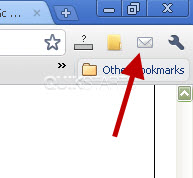
3
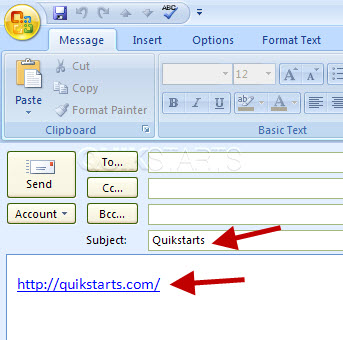
Your email client should should open with the Subject line populated with the title of the website and the sites url included in the body of the email.
Note :
In this example we use the Outlook email client.
4
This task should now be complete. If not, review and repeat the steps as needed. Submit any questions using the section at the bottom of this page.
comments powered by Disqus
 Ask a question or provide an answer