






This guide is part of the Windows 7 series
1.
Create a password for your windows 7 user account
2. Find your ip address from the windows 7 desktop
3. How to add a user account in windows 7
4. How to change a folders photo in windows 7
5. How to change screen resolution in Windows 7
6. How to find windows movie maker in windows 7
7. How to find your ip address in windows 7
8. How to find your Mac address on windows 7
9. How to recover data with windows 7 system restore
10. How to search for Excel files in Windows 7
2. Find your ip address from the windows 7 desktop
3. How to add a user account in windows 7
4. How to change a folders photo in windows 7
5. How to change screen resolution in Windows 7
6. How to find windows movie maker in windows 7
7. How to find your ip address in windows 7
8. How to find your Mac address on windows 7
9. How to recover data with windows 7 system restore
10. How to search for Excel files in Windows 7
Make: Microsoft
Model / Product: Windows
Version: 7
Objective / Info: Learn how to search for all Microsoft Office Power Point files on a computer running Windows 7.
Model / Product: Windows
Version: 7
Objective / Info: Learn how to search for all Microsoft Office Power Point files on a computer running Windows 7.
1
Click on the "Start" button.
2
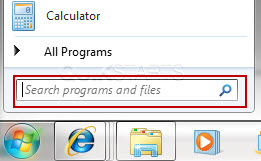
Type "*.ppt" into the "Search Programs and Files" field. The "*" tells windows to search for any file name and the ".ppt" tells windows to search for any Power Point document.
Note :
The results returned should include Power Point 2010 .pptx files as well.
3
As you type, Windows will search and return results for all Word files found locally on your computer. Note :
Double click on any file to open it.

4
This task should now be complete. If not, review and repeat the steps as needed. Submit any questions using the section at the bottom of this page.
comments powered by Disqus
 Ask a question or provide an answer