






This guide is part of the Filezilla for Windows series
1.
How to browse your LAN in Filezilla
2. How to place Filezilla into passive transfer mode
3. How to use FileZilla
4. How to use FTP
2. How to place Filezilla into passive transfer mode
3. How to use FileZilla
4. How to use FTP
Make: FileZilla
Model / Product: Windows
Version: 3.3.2.1
Objective / Info: Change the transfer mode from active to passive
Model / Product: Windows
Version: 3.3.2.1
Objective / Info: Change the transfer mode from active to passive
1
Launch the Filezilla application.2
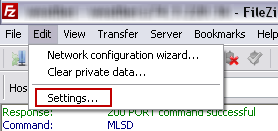
Choice settings from the toolbar.
3
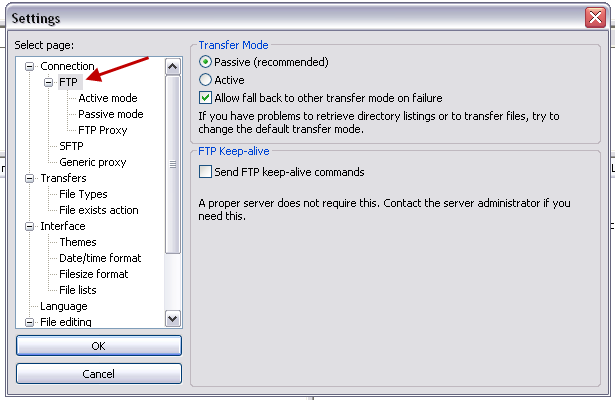
Click ftp from the left column.
4
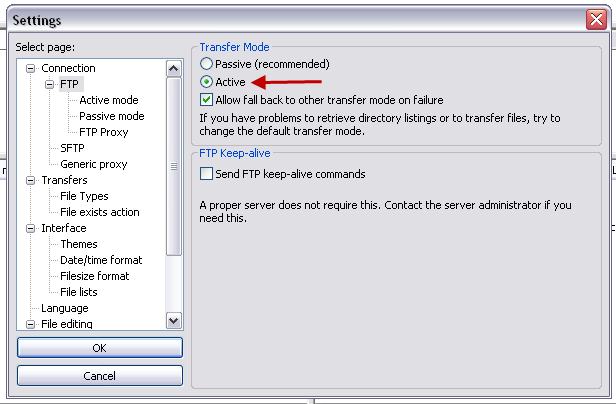
Click the "Active" option beneath transfer mode.
5
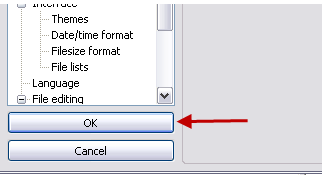
Select the "Ok" button.

comments powered by Disqus
 Ask a question or provide an answer