





This guide is part of the Windows xp series
1.
Enable Microsoft Netmeeting on windows xp
2. Find your ip address from the windows xp desktop
3. How to change screen resolution in Windows xp
4. How to find your ip address in windows xp
5. How to find your Mac address on windows xp
6. How to recover data with windows xp system restore
7. How to search for Excel files in Windows xp
8. How to search for PowerPoint files in Windows xp
9. How to search for Word files in Windows xp
10. How to turn off system restore in windows xp
2. Find your ip address from the windows xp desktop
3. How to change screen resolution in Windows xp
4. How to find your ip address in windows xp
5. How to find your Mac address on windows xp
6. How to recover data with windows xp system restore
7. How to search for Excel files in Windows xp
8. How to search for PowerPoint files in Windows xp
9. How to search for Word files in Windows xp
10. How to turn off system restore in windows xp
Make: Microsoft
Model / Product: Windows
Version: XP
Objective / Info: Find your ip address in windows xp.
Model / Product: Windows
Version: XP
Objective / Info: Find your ip address in windows xp.
1
Click the start menu.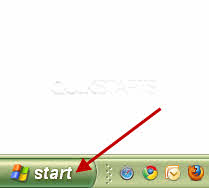
2
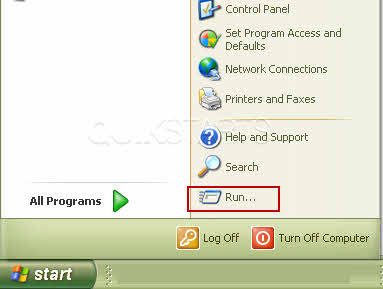
Click the "run" button.
3
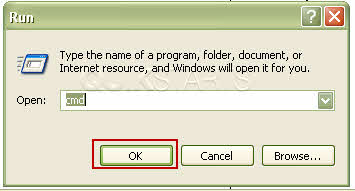
Type "CMD" in the field and click "OK".
Note :
Do not include the quote marks when typing CMD.
4
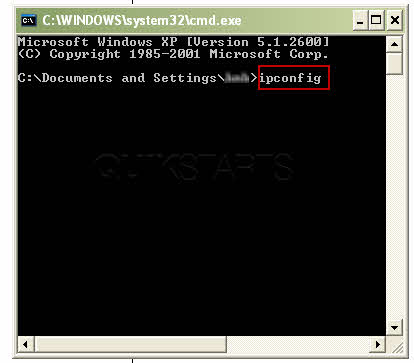
Type the word "ipconfig" at the end of the first line of text. The cursor should be in place and you should be able to type without using your mouse.
Note :
Do not include the quote marks when typing ipconfig.
5
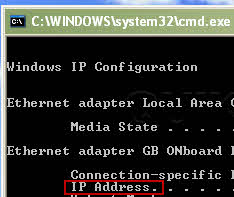
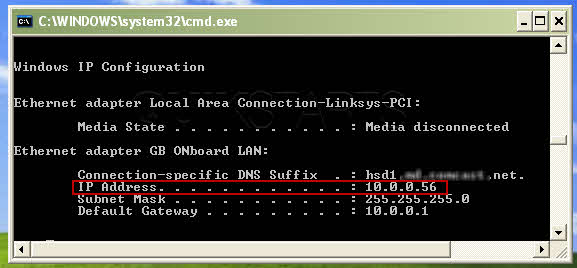
The results should be returned. They may not be identical to these but you should see an ip address.
Note :
This is the ip address of the computer that you are on now.
6
This task should be completed. If not, repeat the steps and try again.
comments powered by Disqus
 Ask a question or provide an answer