






This guide is part of the Google Plus series
1.
Add more than one profile photo in Google Plus
2. Allow email from your profile page in Google Plus
3. Connect Google Plus to Klout
4. Disable google plus post comments before sharing
5. Disable the post resharing feature in Google Plus
6. How to add a spark in Google Plus
7. How to add a spark in Google Plus 9282011
8. How to block someone in Google Plus
9. How to change your display name in Google Plus
10. How to create circles in Google Plus
2. Allow email from your profile page in Google Plus
3. Connect Google Plus to Klout
4. Disable google plus post comments before sharing
5. Disable the post resharing feature in Google Plus
6. How to add a spark in Google Plus
7. How to add a spark in Google Plus 9282011
8. How to block someone in Google Plus
9. How to change your display name in Google Plus
10. How to create circles in Google Plus
Make: Google
Model / Product: Plus
Version: N/A
Objective / Info: Learn how to delete a Google Plus circle.
Model / Product: Plus
Version: N/A
Objective / Info: Learn how to delete a Google Plus circle.
1
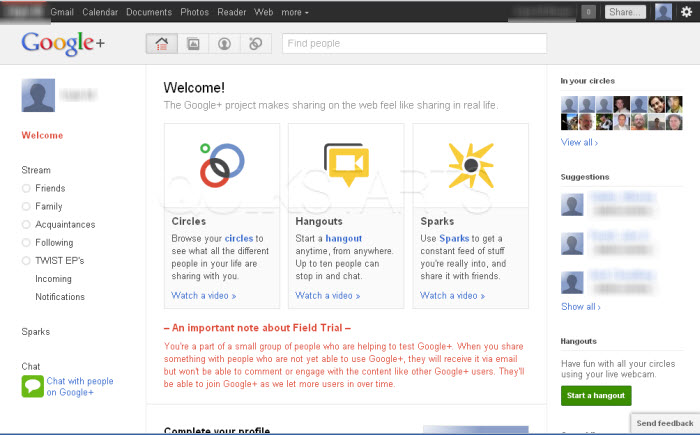
Visit plus.google.com
2
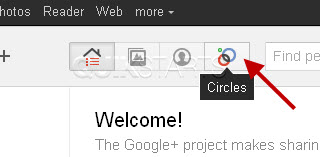
Click the circles icon.
3
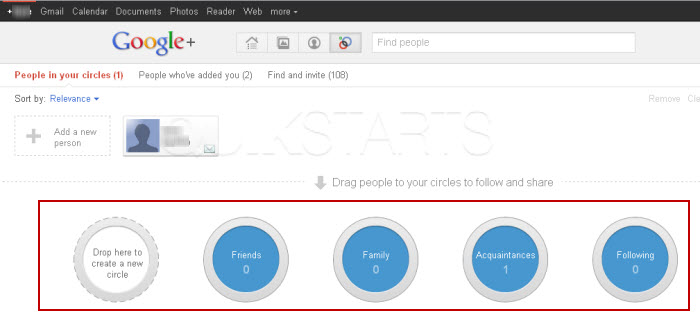
You should be directed to a page containing circles near the bottom and people who are in any existing circles at the top of the page.
4
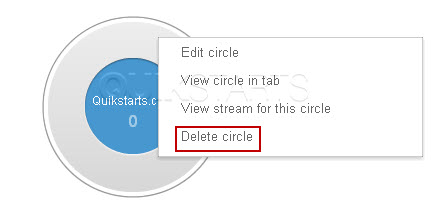
Right click on top of the circle that you want to delete and select "delete", then left click.
5
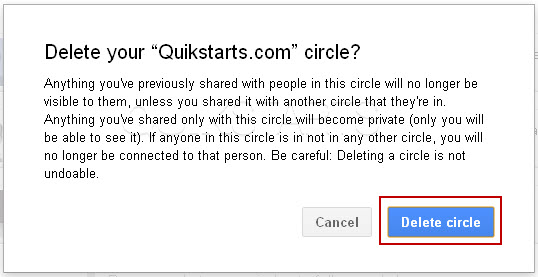
Click the "Delete Circle" button in the pop up window.
6
This task should now be complete. If not, review and repeat the steps as needed. Submit any questions using the section at the bottom of this page.
comments powered by Disqus
 Ask a question or provide an answer