






This guide is part of the Animate PowerPoint 2010 series
1. Change the slide advance speed in PowerPoint 2010
2. How to animate a shape in PowerPoint 2010
3. How to animate PowerPoint 2010
4. How to animate slide transition in PowerPoint 2010
5. How to animate text in PowerPoint 2010
6. Shooting star custom animation in PowerPoint
2. How to animate a shape in PowerPoint 2010
3. How to animate PowerPoint 2010
4. How to animate slide transition in PowerPoint 2010
5. How to animate text in PowerPoint 2010
6. Shooting star custom animation in PowerPoint
Make: Microsoft
Model / Product: PowerPoint
Version: 2010
Objective / Info: Learn how to change the speed at which the slides change automatically during a PowerPoint presentation.
Model / Product: PowerPoint
Version: 2010
Objective / Info: Learn how to change the speed at which the slides change automatically during a PowerPoint presentation.
1
Open PowerPoint by double left clicking the icon on the desktop start menu.
2
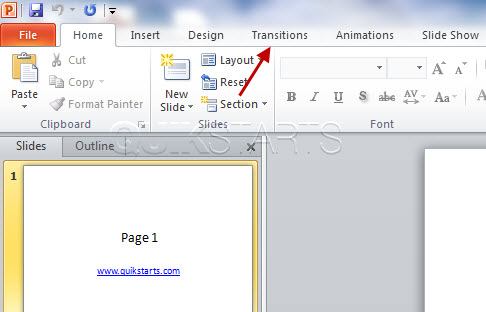
Click the "Transition" tab in your presentation.
3
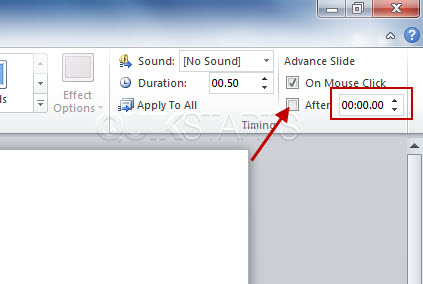
In the upper right hand corner of the page, check the "After" box and set the duration for which you want each slide to change.
Note :
Press "F5" or "Slide Show" to see a full screen preview.
4
If you need to adjust the time go back to step 3 and add or subtract accordingly.5
Save the file when you are done.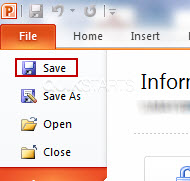
6
This task should be complete. Review the steps if you had any issues and try again.Submit questions or request for more guides in the questions section below.
comments powered by Disqus
 Ask a question or provide an answer