





This guide is part of the Gmail series
1.
Activate Gmail desktop notifications for Chrome
2. Drag and drop gmail attachments to your desktop
3. How to activate the priority inbox in gmail
4. How to add a link to an email using gmail
5. How to add an attachment in gmail
6. How to archive GMail
7. How to change your gmail theme
8. How to create folders in gmail
9. How to forward an email in GMail
10. How to print an email in GMail
2. Drag and drop gmail attachments to your desktop
3. How to activate the priority inbox in gmail
4. How to add a link to an email using gmail
5. How to add an attachment in gmail
6. How to archive GMail
7. How to change your gmail theme
8. How to create folders in gmail
9. How to forward an email in GMail
10. How to print an email in GMail
Make: Google
Model / Product: Gmail
Version: Publish Date
Objective / Info: Actually Gmail does not have folders but uses labels instead. See goo.gl for more information on why.
Model / Product: Gmail
Version: Publish Date
Objective / Info: Actually Gmail does not have folders but uses labels instead. See goo.gl for more information on why.
1
Visit mail.gmail.com by typing it into your web browsers address field.

2
At the top center of the page, click the "Label" drop down menu.
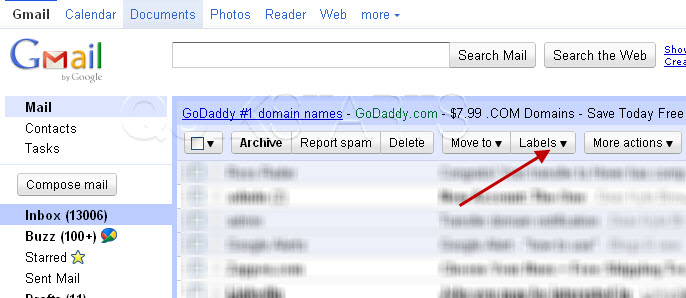
3
Click the "Manage Labels" option at the bottom of the list.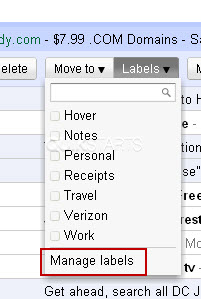
4
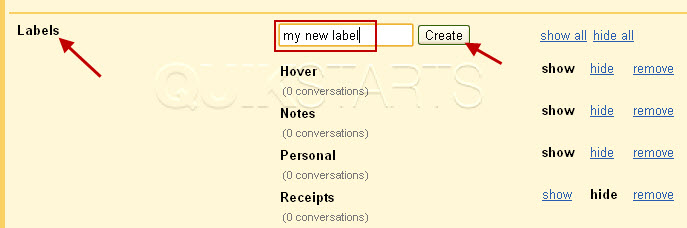
Scroll down to the bottom of the page until you see "Labels" on the right hand side. Type the name of your new label in the "Create a new label" box and click the "Create" button.
Note :
In this example we named the label "my new label"
5
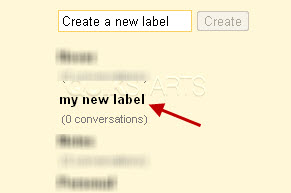
The new label should now show on the list of labels.
Note :
You may not see any other labels but this example shows others that had been created previously.
6
Your new label should also show on the left beneath the inbox.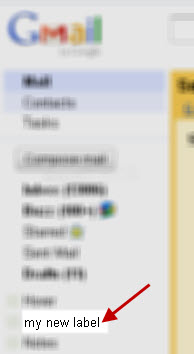
7
This task should now be complete. If not, review and repeat the steps as needed. Submit any questions using the section at the bottom of this page.
comments powered by Disqus
 Ask a question or provide an answer