






This guide is part of the Microsoft Excel 2007 series
1.
Delete a column in Excel 2007
2. How to add a background image to excel 2007
3. How to add a column to a spreadsheet in excel 2007
4. How to add a drop down list in excel 2007
5. How to add a URL to Excel 2007
6. How to auto fit column width in excel 2007
7. How to convert a column into a row in Excel 2007
8. How to create a drop down menu in Excel 2007
9. How to create a pie chart in Excel 2007
10. How to create a popup window in Excel 2007
2. How to add a background image to excel 2007
3. How to add a column to a spreadsheet in excel 2007
4. How to add a drop down list in excel 2007
5. How to add a URL to Excel 2007
6. How to auto fit column width in excel 2007
7. How to convert a column into a row in Excel 2007
8. How to create a drop down menu in Excel 2007
9. How to create a pie chart in Excel 2007
10. How to create a popup window in Excel 2007
Make: Microsoft
Model / Product: Excel
Version: 2007
Objective / Info: Insert a row into a spreadsheet using Microsoft 2007.
Model / Product: Excel
Version: 2007
Objective / Info: Insert a row into a spreadsheet using Microsoft 2007.
1
Open excel by clicking the icon on your desktop or start menu.
2
Lets say we want to insert a row between rows 1 and 3.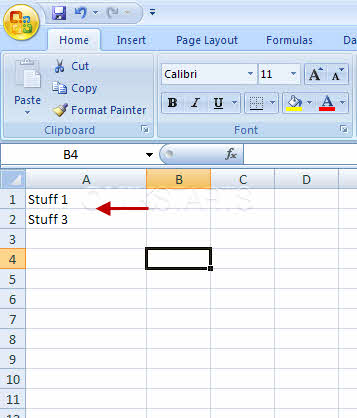
3
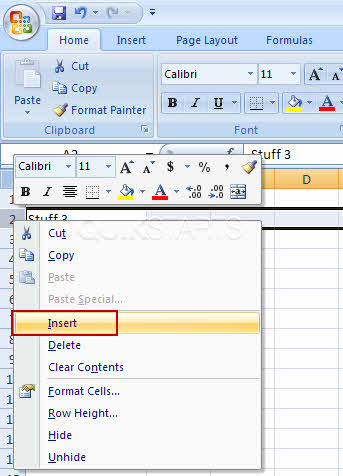
Right click on row 3 of the spreadsheet and select "Insert" Note :
Before you right click, make sure your mouse is placed on the row number to the far left side of the screen.
4
You can now add text to the cell in row two.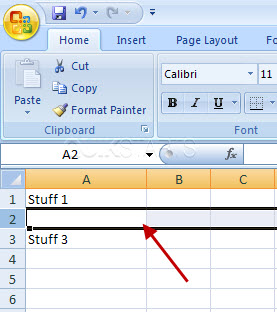
5
This task should be complete. If it is not, review and repeat the steps.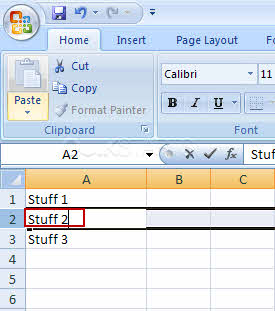

comments powered by Disqus
 Ask a question or provide an answer