





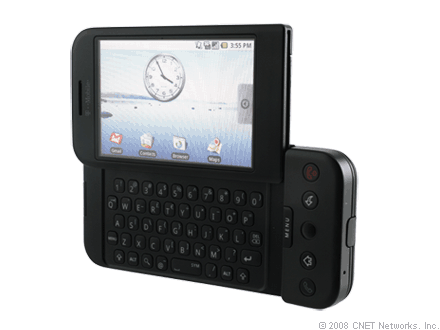
This guide is part of the G1 phone series
1.
How to change the screen orientation on a G1
2. How to download music to g1 phone
3. How to install google mobile apps by text message
4. How to Install the Comcast Xfinity Android App
5. How to open android market on a g1
6. How to send email from a g1
7. How to sync a g1 with a pc
8. How to take pictures on g1 a phone
9. How to use a g1 phone
10. How to use Google Calendar Sync with the g1
2. How to download music to g1 phone
3. How to install google mobile apps by text message
4. How to Install the Comcast Xfinity Android App
5. How to open android market on a g1
6. How to send email from a g1
7. How to sync a g1 with a pc
8. How to take pictures on g1 a phone
9. How to use a g1 phone
10. How to use Google Calendar Sync with the g1
Make: Google
Model / Product: g1
Version: 1.6
Objective / Info: Send an email from the g1 using the stock email feature.
Model / Product: g1
Version: 1.6
Objective / Info: Send an email from the g1 using the stock email feature.
1
Select the tab at the bottom of the screen and click the email icon.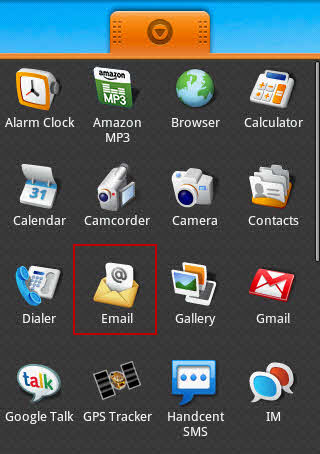
2
Press the "menu" button on the phone itself, then click the "compose" button on the screen.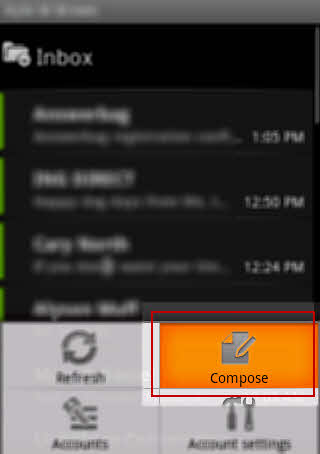
3
Complete the "To", "Subject", and "Body" fields and click the "Send" button.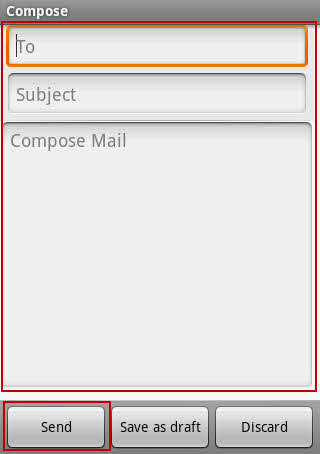
4
This task should be complete. If not, review the steps and try again.
comments powered by Disqus
 Ask a question or provide an answer