






This guide is part of the Windows xp series
1.
Enable Microsoft Netmeeting on windows xp
2. Find your ip address from the windows xp desktop
3. How to change screen resolution in Windows xp
4. How to find your ip address in windows xp
5. How to find your Mac address on windows xp
6. How to recover data with windows xp system restore
7. How to search for Excel files in Windows xp
8. How to search for PowerPoint files in Windows xp
9. How to search for Word files in Windows xp
10. How to turn off system restore in windows xp
2. Find your ip address from the windows xp desktop
3. How to change screen resolution in Windows xp
4. How to find your ip address in windows xp
5. How to find your Mac address on windows xp
6. How to recover data with windows xp system restore
7. How to search for Excel files in Windows xp
8. How to search for PowerPoint files in Windows xp
9. How to search for Word files in Windows xp
10. How to turn off system restore in windows xp
Make: Microsoft
Model / Product: Windows
Version: XP Service Pack 3
Objective / Info: Learn how to find your ip address from the windows xp desktop. See the optional command line method instructions here goo.gl
Model / Product: Windows
Version: XP Service Pack 3
Objective / Info: Learn how to find your ip address from the windows xp desktop. See the optional command line method instructions here goo.gl
1
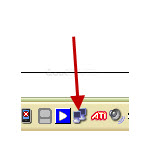
Locate the Network icon in the lower right hand corner of your desktop. Note :
This option may not be available depending on your desktop setup. Use the link in the "Objective" section above as an optional method if this is the case..
2
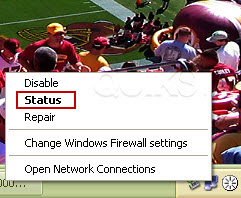
Right click on the Network icon and select the "Status" option.
3
Click the "Support" tab.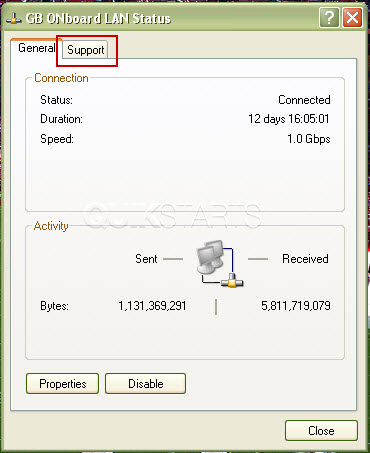
4
The ip address of your computer should be shown in the pop up box.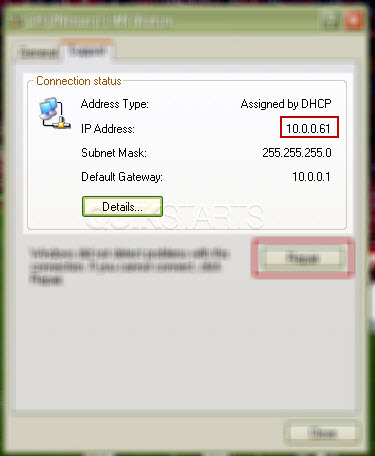
5
This task should be complete. Review the steps if you had any issues and try again.Submit questions or request for more guides in the questions section below.
comments powered by Disqus
 Ask a question or provide an answer