






This guide is part of the Windows xp series
1.
Enable Microsoft Netmeeting on windows xp
2. Find your ip address from the windows xp desktop
3. How to change screen resolution in Windows xp
4. How to find your ip address in windows xp
5. How to find your Mac address on windows xp
6. How to recover data with windows xp system restore
7. How to search for Excel files in Windows xp
8. How to search for PowerPoint files in Windows xp
9. How to search for Word files in Windows xp
10. How to turn off system restore in windows xp
2. Find your ip address from the windows xp desktop
3. How to change screen resolution in Windows xp
4. How to find your ip address in windows xp
5. How to find your Mac address on windows xp
6. How to recover data with windows xp system restore
7. How to search for Excel files in Windows xp
8. How to search for PowerPoint files in Windows xp
9. How to search for Word files in Windows xp
10. How to turn off system restore in windows xp
Make: Microsoft
Model / Product: Windows
Version: XP Service Pack 3
Objective / Info: Search for all Microsoft Office PowerPoint files on a computer running Windows XP.
Model / Product: Windows
Version: XP Service Pack 3
Objective / Info: Search for all Microsoft Office PowerPoint files on a computer running Windows XP.
1
Click on the "Start" button.
2
Click the "Search" icon.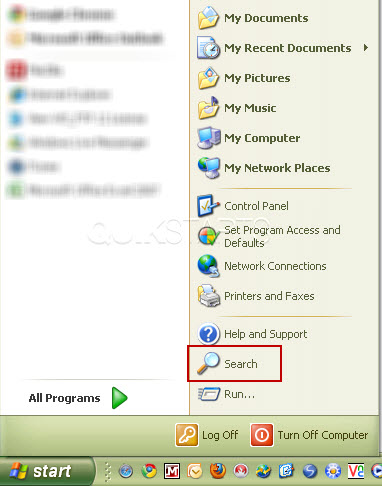
3
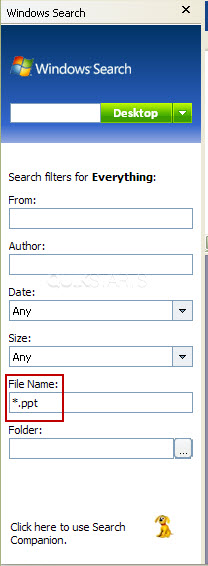
Type "*.ppt" into the Filename column on the left. Note :
The "*" tells windows to search for any file name and the ".doc" tells windows to search for any PowerPoint document.
4
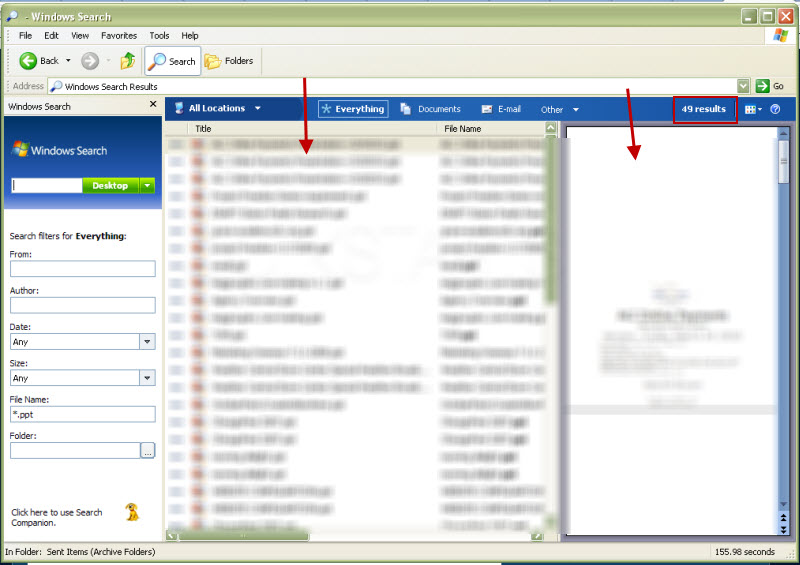
After sometime, depending upon the number of files on your computer, the results should be returned showing from left to right, the middle pane should show a list of all of the PowerPoint files found, the total number on of PowerPoint files found on the top right and a preview of the files on the far right pane beneath the total.
Note :
Double click on any file to open it. Also note that the location of the file is available on the last column of the middle pane.
5
This task should now be complete. If not, review and repeat the steps as needed. Submit any questions using the section at the bottom of this page.
comments powered by Disqus
 Ask a question or provide an answer