






This guide is part of the Google Docs series
1.
Auto fit column width in Google docs spreadsheets
2. Change a date in a Google doc spreadsheet cell
3. Change the hyperlink color in a docs document
4. Change the slide speed in Google Docs presentation
5. Convert Google docs spreadsheet into a PDF file
6. Convert Google docs spreadsheet into an Excel file
7. Freeze top row when scrolling in Google Docs
8. How to add a bookmark in Google Docs
9. How to add a cell border in Google Sheets
10. How to add a column to a google docs spreadsheet
2. Change a date in a Google doc spreadsheet cell
3. Change the hyperlink color in a docs document
4. Change the slide speed in Google Docs presentation
5. Convert Google docs spreadsheet into a PDF file
6. Convert Google docs spreadsheet into an Excel file
7. Freeze top row when scrolling in Google Docs
8. How to add a bookmark in Google Docs
9. How to add a cell border in Google Sheets
10. How to add a column to a google docs spreadsheet
Make: Google
Model / Product: Docs
Version: Spreadsheet
Objective / Info: Add a url to a Google docs spreadsheet.
Model / Product: Docs
Version: Spreadsheet
Objective / Info: Add a url to a Google docs spreadsheet.
1
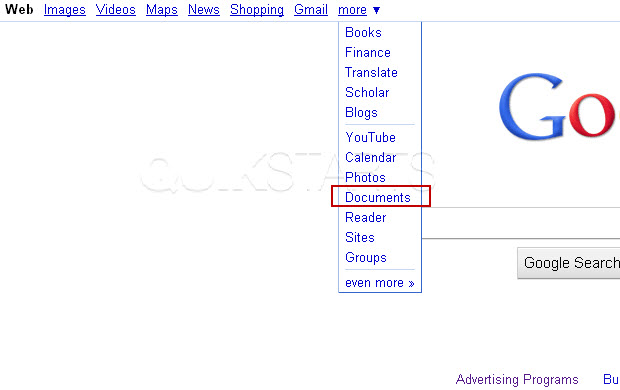
Launch Google Docs spreadsheet by visiting google.com, click the "more" menu otpion and select "Documents"
2
Select "Spreadsheet" from the menu.
3
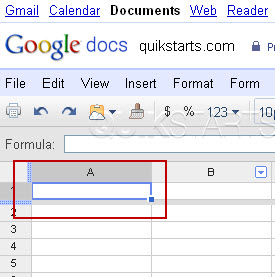
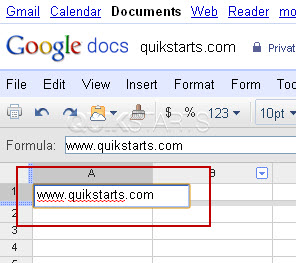
A new blank spreadsheet should open. Type the URL into the document and be sure to include the www prefix. Note :
We use cell A1 in this example.
4
The URL should not be click-able and colored black as normal text.
5
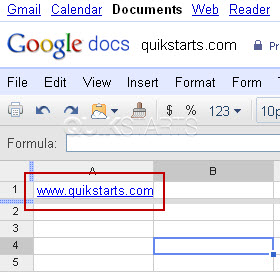
Press the "Enter" button following the URL and it should change color and become click-able.
6
This task should be complete. Review the steps if you had any issues and try again.Submit questions or request for more guides in the questions section below.
comments powered by Disqus
 Ask a question or provide an answer